Lagos Life Sims: A Beginner's Guide
Looking for Lagos Life Sims? If you mean Shalom Rayhamen's Lagos life simulator, start at the official browser game, lagoslife.app. This guide helps you identify the right game, understand its relationship to The Sims, and choose a manageable goal for your first session.
Opens lagoslife.app in a new tab. Choose Sign up or Log in on the game site.
What does Lagos Life Sims refer to?
Lagos Life is a life-simulation game set around Nigerian everyday experiences. Arise News's October walkthrough uses the name Lagos Life Sims and reports that its creator drew inspiration from The Sims 3. The official game presents itself as Lagos Life.
The same walkthrough describes creating a character, working, recovering energy with food and building a virtual lifestyle. Its Nepo and Lapo starting circumstances give characters different financial beginnings. We treat those as reported mechanics; we did not create a character to test them.
Check which game a page means. The similarly named Lagos Life Sims site with Eko Hustle describes its game as independent and separate from the official Lagos Life. A shared search phrase does not make the sites interchangeable. Our play buttons lead to lagoslife.app.
If you already know the game and only need your account, go straight to the Lagos Life login guide. For phone access, use the Lagos Life app and mobile guide.
Lagos Life and The Sims: where the comparison helps
The useful comparison is the kind of decisions you make: a character's daily life, work and personal goals. It does not mean the two games share accounts or that Lagos Life is content you install into The Sims. Here we compare the verified Lagos Life entry with EA's description of The Sims 4.
| Question | Lagos Life | The Sims 4 |
|---|---|---|
| Where do I start? | Open lagoslife.app in a browser and use its account screen. | Use EA's download links for PC, Mac or a supported console. |
| What is the focus? | A simulated life with Lagos places and Nigerian cultural references. | Create Sims, build homes and guide their lives. |
| What can I check before entering? | The public city map, venue names and signup or login options. | EA's game overview, platform options and system requirements. |
| Which guide should I use? | A Lagos Life guide tied to the current official game. | EA's help and documentation for the relevant Sims release. |
If your aim is to try a Lagos setting without first downloading a game, the browser entry is a practical starting point. If you want the building tools EA describes for The Sims 4, check that game's own product page. Do not assume a feature exists in one because it exists in the other.
Look around the Lagos Life city map
The signed-out map gives you a way to recognise the setting before opening an account. Our 13 October check showed venue buttons including Amala Shitta, CcHub, Quilox, The Library and Marina Towers. These are labels observed on the public screen; we did not test the activities inside each venue.
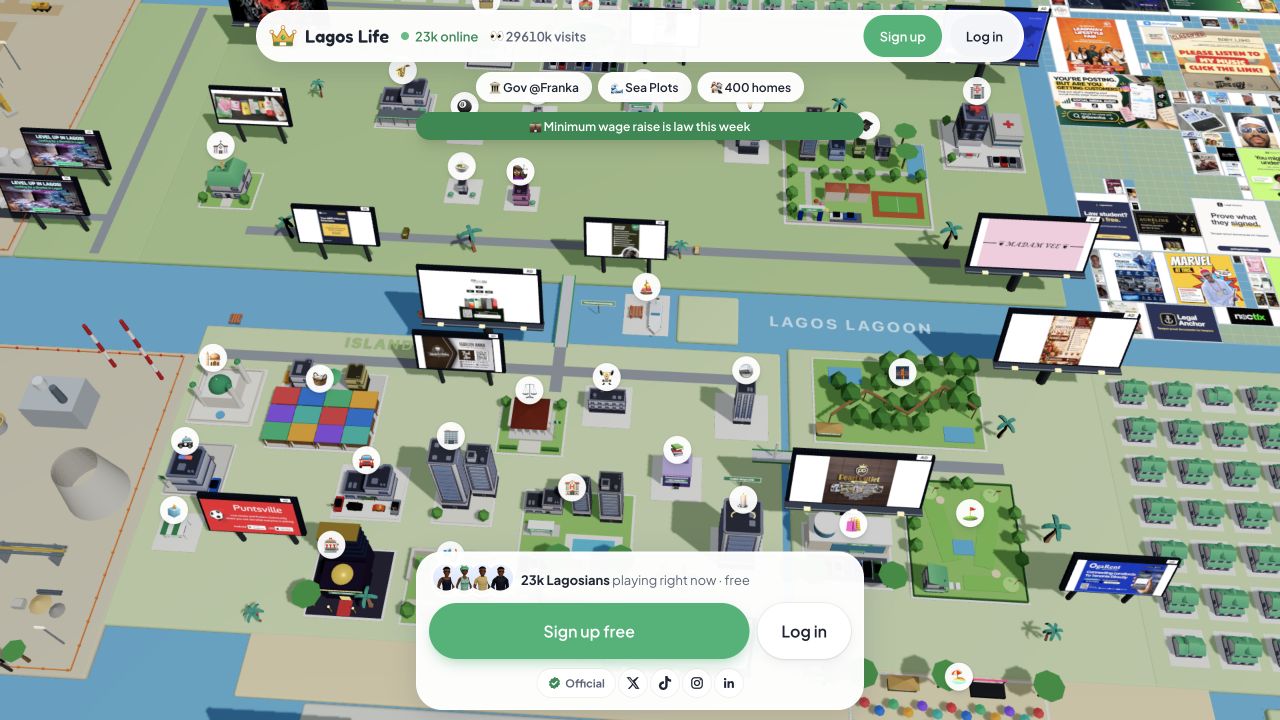
Try using the map to pick one place you want to learn about. Read the screen it opens before deciding what to do next. A public map is a preview of the city; it does not show that you have entered your own character's session.
For a guided starting route, our how-to-play page documents the account prompt reached from Office and Marina Towers during the earlier check. Buttons and available destinations can change as the game develops.
Lagos Life Sims: your first-session checklist
Our suggested approach is to learn one routine before trying every venue. A small goal makes it easier to tell which choices helped your character and which used resources you needed elsewhere.
Start with the right account screen
Open the official game from the button above. If you already have an account, select Log in; if this is your first visit, select Sign up. The public city map is useful for orientation, but you still need to follow the account screens to enter your own session. Our login and registration guide walks through those controls. Use it if you are unsure which form you are viewing.
Learn what your character can afford
After following the game's setup, read the balance and the costs shown in your own session. Write down an expense before committing to it. For example, if you are deciding between a purchase and another activity, compare what remains after each choice rather than judging only by the starting balance.
For a planning example, suppose you have 1,000 Game Naira and are considering a 300 Game Naira expense. That leaves 700 before any later costs. These numbers illustrate the calculation; replace them with the prices and balance on your screen. Allow for the next required expense before making an optional purchase.
Understand one work-and-recovery cycle
Arise reports a loop in which work uses energy and food restores it. Our money guide turns that into a record-keeping checklist: note the credited pay and the recovery spending, then see what is left. Follow the current game controls for actual requirements and prices.
Leave room for the next session
Choose a savings target after you understand the routine. It might be the next expense displayed by the game or a personal goal you want to reach. We suggest keeping a short note of the goal and your last result so you can resume without having to reconstruct every decision.
Before you leave, make a short record you can use next time:
- The balance you started with and the balance you finished with.
- One action you tried, its displayed cost and the result you saw.
- The next venue or expense you want to investigate.
Use these notes to compare choices in your next session and adjust your plan to the controls and outcomes you actually see.
Lagos Life Sims questions
Is Lagos Life Sims an expansion for The Sims?
The Lagos Life covered here is a separate browser game reached through lagoslife.app. The Sims comparison describes its life-simulation inspiration. This guide does not provide a Sims expansion or mod download.
Are all sites named Lagos Life Sims the same game?
Check the maker and destination. Eko Hustle's own site says it is separate from the official Lagos Life. If you mean Shalom Rayhamen's game, use the official entry linked above.
Can I start without installing a game?
Yes, the official map and account screens open in a browser. Our app guide explains phone access and home-screen shortcuts. A browser entry does not establish whether a separate native release exists.
Is Lagos Life suitable for children?
The official eligibility terms set an age minimum of 18. That rule applies to the official game covered here.
Sources and checks
- Official Lagos Life game — public map and account entry inspected on 13 October 2026.
- Arise News walkthrough — published 5 October 2026; the creator, Sims inspiration and reported play loop.
- EA's The Sims 4 page — product features and download destinations.
- Eko Hustle's own description — used only to distinguish the separate game.
- Official Terms of Use — eligibility reviewed on 13 October 2026.
The map is a real dated capture. No signed-in gameplay, account creation, work shift or purchase was tested. The session-planning suggestions are our editorial advice.