Lagos Life App: Android & iPhone Browser Guide
For Lagos Life app access, start with the browser game at lagoslife.app. Its public map has Log in and Sign up controls. Below are Android and iPhone browser steps, a real mobile-width screenshot, shortcut instructions and help with loading or account problems.
Opens the Lagos Life browser game at lagoslife.app in a new tab. Choose Sign up or Log in there.
Lagos Life app: the official browser link
The Lagos Life browser app opens on a public city map. Our signed-out visit showed Sign up and Log in controls, and the login form accepts a username or email and password. Our Lagos Life login guide covers those fields and the recovery options in detail.
| Result | What to check |
|---|---|
| Browser game | Open lagoslife.app. The map and account entry are the route verified for this guide. |
| Home-screen shortcut | It points back to a website you choose. Check that the destination is the official game before adding it. |
| APK or app-store listing | Check the publisher and whether the original game's own website or linked official accounts identify that release. |
We have not verified a native Android or iOS release. You can reach the public map and account screens through the browser version. For any APK or store listing, check that the game's own site or linked accounts identify the publisher and release.
For announcements, the official game links to @LagosLifeApp on X and its other social accounts. Follow those links from the game when checking a new release rather than relying on a matching name in search results.
Android and iPhone: open Lagos Life in your browser
Open Lagos Life in your phone browser
On Android, open lagoslife.app in Chrome; on iPhone, use Safari. If you arrived from a social post, copy the game link into your usual browser. This gives you a known place to return to, with the browser's own bookmark and shortcut controls.
Choose the account option you need
Choose Log in to return to your Lagos Life account or Sign up to register. The public city map can be visible while you are signed out. Keep the account guide open if you need registration or password help.
Follow the game's current setup
Read the prompts before submitting anything. Once you enter your character's session, the beginner guide offers a first-session checklist. Use the same account when you return.
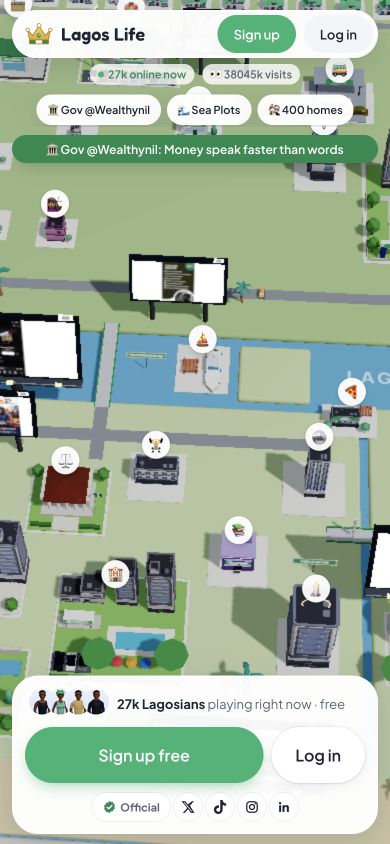
Our check confirmed the public map and login controls at this width. It did not test signed-in play on a physical phone, every browser version or a native app. If a control is hard to see on your device, start with the loading checks below.
Save a Lagos Life app shortcut to your home screen
A saved icon gives you a shorter route back to the website. Browser and operating-system versions may use different labels. These instructions follow Apple and Google's browser help; we did not install a shortcut on your device.
iPhone: use Safari's sharing menu
To save Lagos Life on iPhone, open lagoslife.app in Safari. Use Share from the page menu or toolbar, then choose Add to Home Screen. In Apple's current instructions, turn on Open as Web App and tap Add. If the home-screen action is missing, use Edit Actions to make it available. Labels can differ on older iOS versions. Apple's home-screen instructions.
Android: create a Chrome shortcut
On Android, open Lagos Life at lagoslife.app in Chrome. Google's current instructions use More → Install and create shortcut → Create shortcut. Keep the suggested name or choose your own, then tap Add. A shortcut with the Chrome logo opens in Chrome; the menu on your version may differ. Google's shortcut instructions.
Create the shortcut while viewing lagoslife.app so the icon takes you straight to the game. Choose a name you can recognise, such as Lagos Life. If the game later asks you to log in, use your existing account or its recovery controls. Account access still follows the game's login screens.
A browser shortcut does not establish a native app release or promise offline gameplay. For desktop access, bookmark the Lagos Life game link so you can return without searching again.
Lagos Life app not loading: check the screen you see
Check what Lagos Life actually displays before choosing a fix. An unfinished page calls for a browser or connection check; a visible map with an account error calls for login help. Note the message and the step that led to it, so you can describe the issue if you need support.
| What you see | Next useful check |
|---|---|
| A blank or unfinished page | Confirm that you are on lagoslife.app and your connection is working, then reload once. Try your usual browser if you arrived through a social app. |
| The map, but no character session | Use Log in for an existing account. A public map can be visible while signed out. |
| Account details rejected | Read the error and use the login guide. The official screen offers Forgot password? and Can't get in? controls. |
| A missing shortcut menu | Use Apple or Google's instructions for your browser version. You can still open or bookmark the URL normally. |
If the issue persists, describe what happened to the official game's support team. Its published contact is in the Terms. Avoid clearing saved browser data as a first step when you are unsure of your login details.
Lagos Life app questions
Do I need to download a Lagos Life APK?
No APK is needed for the browser entry verified here. Open lagoslife.app to reach its map and account screens. We do not distribute or authenticate third-party download files.
Is an app named Lagos Life automatically the original game?
A matching name is not enough. Check the maker and the destination linked by the original game. The Lagos Life Sims guide explains why similarly named games can appear in the same searches.
Can I use the Lagos Life app offline?
This guide covers the online browser entry. We have not verified an offline mode; adding a shortcut alone does not show that one is available.
Can I log in from another device?
Open the official game and use your existing username or linked email and password. We inspected the login form, but did not test an account moving between devices.
Is signup free?
The public entry offers Sign up free. That does not mean every later purchase is free; check the game for any optional paid items. Its eligibility terms require players to be 18 or older.
Sources and checks
- Official game — public map, phone-width login controls and linked social accounts checked on 13 October 2026.
- Official Terms of Use — eligibility and support contact.
- Apple Safari guide and Google Chrome Help — current home-screen instructions, reviewed on the same date.
No account was created, password entered, shortcut installed or native package tested. The screenshot documents only the public browser entry. Performance and signed-in play on physical phones remain untested.