How to Play Lagos Life: Beginner Guide
This guide explains how to play Lagos Life, from finding the official browser game to planning your first work-and-food routine. Start with the registration or login steps below, then check your character's balance and needs before spending Game Naira.
Need the account screen? Use the Lagos Life login and sign up guide for the official entry link and current recovery options.
Registration and login screens were inspected directly. The gameplay checklist follows Arise News; signed-in actions and prices have not been tested.
Before you start playing Lagos Life
Have a working internet connection and the official site open in your browser. Existing players need their username or email and password. New players should have their account details ready and be able to complete the date-of-birth fields. The registration form requires an 18+ agreement, so read the linked policies before deciding to sign up.
Use the same Lagos Life account when you return. If a venue opens a signup prompt, look for the login choice before filling in a new registration form. The public map is useful for finding the entry controls, but seeing the city is not evidence that you are signed in or that a character has been created.
Create your Lagos Life account
You can open Lagos Life in a browser. Our signed-out visit showed the city map with Sign up free and Log in controls. Registration takes place at lagoslife.app.
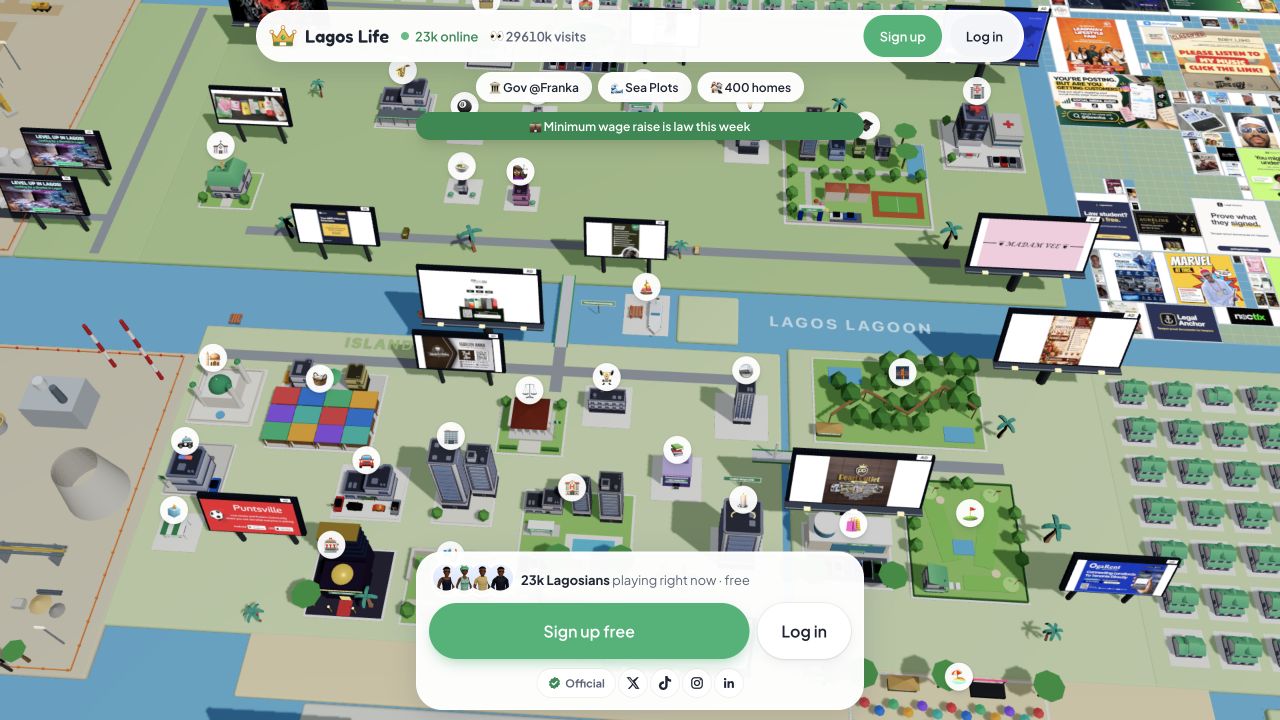
Open lagoslife.app
Check the address before entering any account details. On the public map, select Sign up free; the header also has a Sign up button.
Complete the Create account form
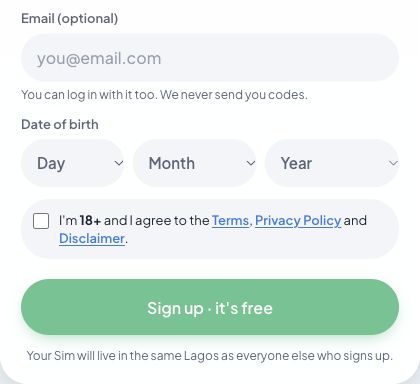
Enter your name, username and password. The password hint requires at least eight characters. Email is marked optional. Select your date of birth using the Day, Month and Year menus.
Read the age and agreement checkbox
The form asks you to confirm you are 18 or older and agree to the Terms, Privacy Policy and Disclaimer. Open those documents and read them before deciding whether to agree.
Submit when you are ready
The final button is labelled Sign up · it's free. After registration, follow the setup instructions the game displays. We inspected the form without creating an account, so later avatar choices are not verified here.
| Field | What the current form shows |
|---|---|
| Your name | A name field above the username. |
| Username | The form describes this as your Sim's name in Lagos Life. |
| Password | At least eight characters; a Show password control is available. |
| Optional. The hint says it can also be used to log in. | |
| Date of birth | Separate Day, Month and Year menus. |
| Agreement | An 18+ confirmation linked to three policy documents. |
Once your account is ready, start with one work session, then restore energy and plan for rent.
Log in to Lagos Life with an existing account
Select Log in
Open the official game and select Log in on the map. If the registration form is open, switch to its Log in tab.
Enter your existing details
The login form has two fields: Username or email and Password. Enter the details for the account you already use, then select the form's Log in button.
Use the recovery link if needed
Use Forgot password? on the official screen. Our password recovery guide explains the first recovery screen and the Can't get in? help options checked on 13 October 2026. No password reset was submitted.
How to play Lagos Life: your first session
Arise News's walkthrough describes a random Nepo or Lapo start, jobs that consume energy, food that restores it, and leisure venues that improve mood. Use the current game screens for amounts and requirements.
Read your starting position
Check your character's balance and starting circumstances. A limited-budget Lapo start makes finding income an early priority.
Find an available job
Read its requirements and energy cost before committing. The public map has an Office marker; clicking it while signed out opened a Marina Towers prompt to create an account or log in. We have not verified the job controls beyond that prompt.
Recover before the next shift
Check energy after working and keep money for food. Our recommendation is to reserve the next refill before optional purchases.
Next, check your rent and recurring bills before spending the rest.
Keep a buffer
Set aside the bills shown by your account and some room for setbacks. Expand into leisure, property or other purchases as your budget allows.
Choose one manageable first-session goal
For a beginner, a useful goal is to understand one work-and-recovery cycle. Note your balance before work, check what the session credits, and record what you spend afterwards. You can then judge whether repeating that activity leaves enough for the next meal and the bills your account shows. This is our suggested learning method, not a claim that every character has the same costs.
When exploring Lagos Life, separate finding a venue from spending there. Read the available action and its price before confirming it. A visit that improves mood may be worthwhile, but keep the next essential expense in view. Finish the session knowing your balance, what needs recovery and which action you plan to try next.
For a method to track what each shift actually leaves you, use the Lagos Life money guide.
Lagos Life signup and login troubleshooting
| Problem | Next step |
|---|---|
| A map venue asks you to sign up | The public Office prompt did this during our check. Select I have an account · Log in if you already have one. |
| You cannot log in | Check the username or email field and password. Use the visible recovery button if you have forgotten the password. |
| The signup button will not proceed | Read the form's validation message. Compare the fields with the checklist above, including date of birth and the agreement; this is a troubleshooting suggestion, not a tested error case. |
| The city does not finish loading | Check your connection and try reloading the official page. Loading failures and maintenance have different causes, so a blank screen alone does not identify the problem. |
| You need account support | The official Terms list [email protected]. Describe the problem without sending your password. |
Questions about getting started
Do I need a download to play Lagos Life?
The entry steps in this guide use lagoslife.app in a browser. Our check reached the public map and account forms through that address, so these steps do not require a separate installer. If a search result offers a download, check its connection to the developer before treating it as the same game. This guide does not verify app-store or APK listings.
Can I play without creating an account?
You can view the public map while signed out. During our visit, selecting Office opened a Marina Towers prompt with signup and login choices. That confirms the account requirement for the entry we inspected; it does not establish that every public feature behaves the same way. Returning players should choose Log in, while new players can follow the registration checklist above.
What should I do first with a limited starting budget?
Begin by reading your character's balance and the opportunities currently available. Arise News's walkthrough puts finding work early in a limited-budget start because work pays and food restores the energy it uses. Our recommendation is to learn that cycle before making optional purchases. Record costs as you go, and use the Game Naira budget worksheet when you need to decide what you can afford.
Sources and checks
Sources reviewed 2026-10-10. Screenshots above document the public entry screens; the walkthrough supplies the reported gameplay mechanics.
- Lagos Life browser game — public map, Create account and Log in forms, and Office → Marina Towers account prompt. Screenshots were captured during that visit.
- Official Terms, sections 2–3 and 32 — age, account rules and the support contact.
- Arise News: How Lagos Life Is Capturing Young Nigerians Online — published 5 October 2026; source for the reported beginner gameplay loop.
Buttons and mechanics can change. This guide gives no fixed starting balance, salary, rent amount or bill date, because those have not been verified in a signed-in session.